PoolQ registration
How to Register for the Intro Program
Registration for the Pictou County Mariners Intro Program is completed through our website using PoolQ.
The process has three parts:
- Create your family account.
- Add your swimmer and payment information.
- Register your swimmer for the Intro Program.
Before You Begin
You will need:
- A current email address
- Your swimmer’s information
- Your contact information
- A credit card or Canadian bank account for payment
Part 1
Create Your Account
- Visit the Pictou County Mariners website.
- Select Sign In in the top right-hand corner.
- Select Create Account.
- Enter your email address and create a password.
- In the Account Request Message, explain that you would like to register your swimmer for the Intro Program. Including your swimmer’s name will help us identify your request.
- Complete the I’m not a robot verification.
- Submit your account request.
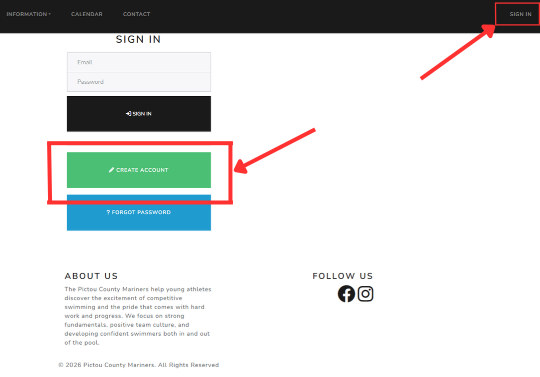
Select Sign In and then Create Account.
Your account must be approved
Your account must be approved by the club before you can continue. Once it has been approved, return to the website and sign in using the email address and password you created.
Already have a PCM PoolQ account? You do not need to create another one. Sign in using your existing account information.
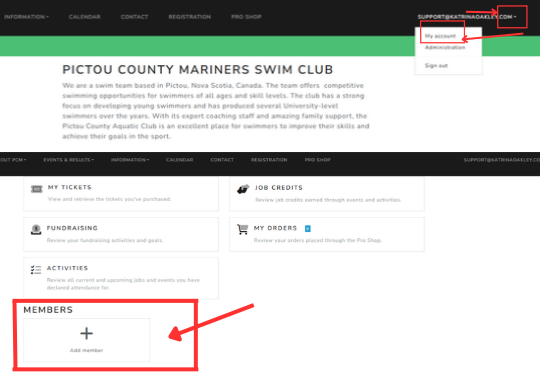
Open My Account and select Add Member.
Part 2
Add Your Swimmer
After signing in:
- Click the drop-down menu beside your email address in the top right-hand corner.
- Select My Account.
- Select Add Member, which is normally found near the bottom of the page.
- Enter the requested information for your swimmer.
- Review the information and save the swimmer’s profile.
If you are registering more than one swimmer, repeat these steps for each child.
Payment information
Add a Payment Method
A payment method must be connected to your account before registration can be completed.
- From My Account, open Payment Methods.
- Choose one of the available payment options:
- Select Add Payment Method to add a credit card.
- Select Link Canadian Bank Account to use a Canadian bank account.
- Follow the instructions provided by PoolQ’s secure payment service.
- Check that your new payment method appears in your account.
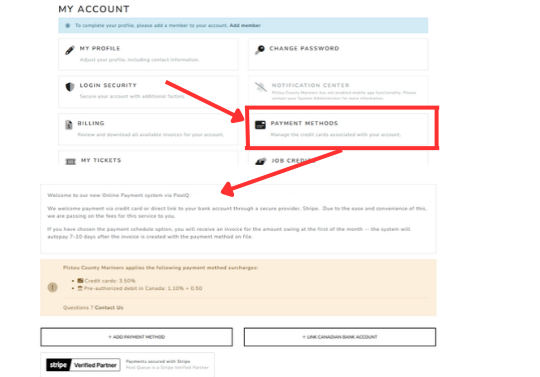
Add a credit card or link a Canadian bank account.
A note about transaction fees
The transaction fee is higher when paying by credit card. PoolQ will display the applicable processing fees when you add or use your payment method.
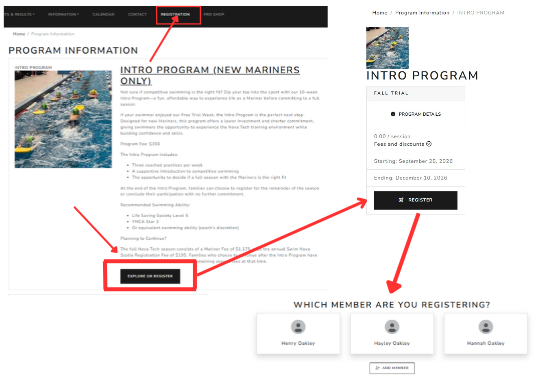
Select the Intro Program and choose the swimmer you are registering.
Part 3
Register for the Intro Program
Once your swimmer and payment information have been added:
- Select Registration from the menu at the top of the website.
- Find the Mariners Intro Program registration.
- Select the registration to begin.
- Choose the swimmer you are registering.
- Complete the requested information.
- Review the program information and registration summary carefully.
- Read the policies, waivers and consent information.
- Select the box confirming that you agree to the terms.
- Select Confirm and Pay.
If you are registering another swimmer, return to the registration page and complete the process again for that child.
Registration confirmation
You will receive an email confirming that your registration has been submitted. Your payment will not be processed immediately.
Final check
Confirming Your Registration and Payment
Once you receive the registration confirmation email, your swimmer has been successfully registered for the Intro Program.
To check the status of your payment:
- Open the drop-down menu beside your email address.
- Select My Account.
- Open the Billing area.
- Find the Intro Program payment.
The payment will show whether it is currently Processing or has been Paid.
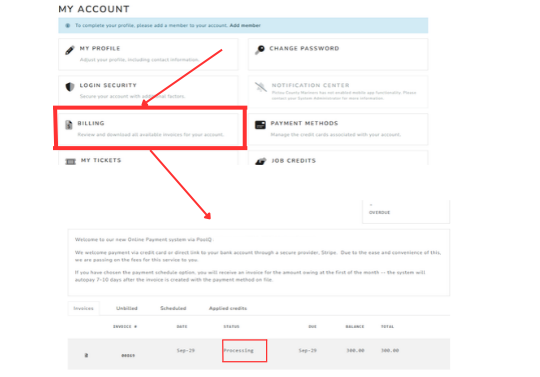
Check the Billing area to see whether your payment is Processing or Paid.
Need Help?
If you cannot create your account, do not see the Intro Program registration, or are unsure whether your registration was completed, please contact us before submitting the registration a second time.